- configurator
- Shop Online
- Your Car
- Support
- Owners Manual
- Updates
- Bluetooth Compatibility Charts
- Connectivity chart
- Application Charts
- iPod compatibility
- Model Overview
- Amplifier/Speaker Matching Chart
- Alpine Sound Lab software for PDP-E800DSP
- Alpine Sound Lab software for PDP-E802DSP
- PC Software for HDP-D90
- PC Software for PWD-X5
- PC Software for PXE-C80-88
- Alpine Dash Cam Support
- FAQ
- Technical Support
- Service Centers
- Centri di assistenza
- grey product warning RU
- Opening screen Customisation
- Find a Store
- Media Center
- Contact


ALPS ALPINE EUROPE GmbH, Alpine Brand
Trusted Alpine sound quality


 Share
Share
 Print
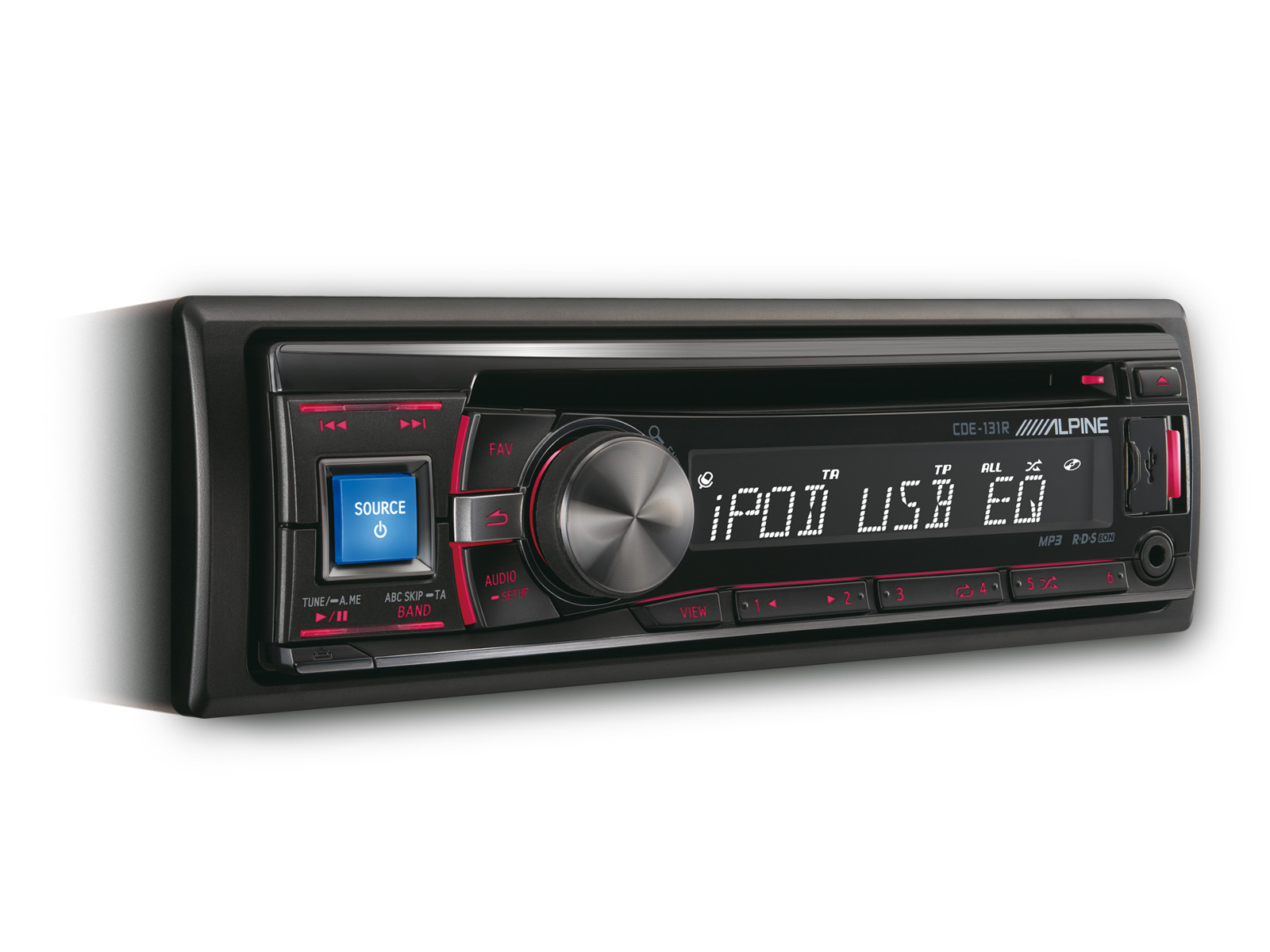
Print CD RECEIVER WITH USB AND iPod CONTROLLER
CDE-131R
The CDE-131R CD receiver offers just what you need. Play your iPod® or iPhone® via USB (cable sold separately) and control music playback and search functions right from the head unit. Alternatively you can also switch to Direct Control Mode and control playback from the iPod® and iPhone® directly. The convenient USB port and 3.5mm auxiliary input on the front of the unit allow you to easily hook up USB flash drives or an MP3 player.


Technology


Product information
4 Illumination Colours Selectable
 You can adjust the Head Unit’s button illumination color to match your dash. The main button can be switched to green, blue, red or amber illumination, while the other buttons can be set to green or red illumination.
Made for iPhone® and iPod®
 You can control your iPhone/iPod from the head unit, using Quick Search to find songs fast. Direct iPod Control Mode lets you use the iPhone/iPod interface for direct operation and for viewing information in your desired language. This comes especially handy when a passenger selects the music while you keep your eyes on the road. Connect your iPod® or iPhone® via the CDE-131R’s front USB port (requires KCU-445i or the original Apple USB cables that comes with your Apple product).
Quick Search
 Here’s the best way to find your music fast. The rotary knob and Quick Search feature let you easily and quickly browse through your iPod music by playlist, artist, album, song, genre, podcast, audiobook or composer.
Expand your listening choices with USB and AUX-Input
 Expand your listening choices by plugging your USB mass storage device into the front panel USB port. There’s also a 3.5mm mini jack for MP3 players.
Works with Nokia
 You can connect Nokia (Symbian™) phones via USB to play back the music stored on the phone. You can also control basic music playback functions such as play, pause and title skip and search for music by files and folders. The phone also charges while it is connected. Requires KCU-230NK connection cable. © 2011 Nokia. All rights reserved. Nokia and Works with Nokia are trademarks or registered trademarks of Nokia Corporation.
Features & Specifications
FEATURES
Tuner
- Memory Presets: Preset Stations (FM:18 / MW:6 / LW:6)
- Memory: Auto Memory
- Seek Mode: Local/DX Selection
RDS
- Max Tune Tuner
- RDS Functions: AF, TA, TP, RADIO TEXT
- Tuner Presets: FM x 18, MW x 6, LW x 6
- Local / DX Selectable
Made for iPod® / iPhone®
- Connection Type: USB Connection
- Compatibility for iPod® / iPhone®: iPod touch 5G - 1G, iPod nano 7G - 1G, iPod classic 160GB/120GB/80GB, iPod with video, iPhone 4S, iPhone 4, iPhone 3GS, iPhone 3G and iPhone
- Connection: KCU-445i (sold separately) required
- M.I.X. (Shuffle) Play: Song, Album, All
- Available Selections: Playlist, Artist, Album, Song, Podcast, Genre, Composer, Audiobook
- Repeat
- Music Control: Skip Up/Down, Fast Forward/Fast Backward
- Direct Up/Down: Playlist/Artist/Album/Genre/Composer Selection
- Alphabet Search
- Percentage Search
- Direct iPod/iPhone Control
- Battery Charging
Works with Nokia
- Works with supported Nokia (Symbian™) Phones: Mass Storage Mode
- Connection Type: Micro USB Connection
- Connection: KCU-230NK (Sold separately) Required
- Muisc Playback: MP3 Playback
- File/Folder Name Search
- Folder Up/Down
- Battery Charging
Disc Player
- Disc Type: CD Player
- Disc Playback Type: CD, CD-R/RW
- Music Playback: CDDA, MP3
- Playback Control: Skip Up/Down, Fast Forward/Fast Backward
- Repeat
- M.I.X. Random Play: Track/File, All
- CD Text Display
- Multi Bit DAC
- 0 Bit Mute
- Digital Servo
USB Media Connection
- Front USB Connection
- MP3 Playback
- USB Class: Mass Storage Class
- File/Folder Name Search
- Folder Up/Down
Sound Tuning
- Subwoofer Level Adjustment: 0 to +15
- Subwoofer Phase Select (0°/180°)
- Subwoofer Level Control Adjustment
- High Pass Filter: Off / 60 / 80 / 120 / 160 Hz
- Low Pass Filter: Off / 60 / 80 / 120 / 160 Hz
- Default Equalizer setup: Flat, Pops, Rock, News, Jazz, Electrical Dance, Hip Hop, Easy Listening, Country, Classical, User Setup
-
3-band Parametric Equalizer (-7 to +7)
TW: 7,5 / 10 / 12,5 / 15kHz (Q 0.75 / 1.25)
MID: 0,5 / 1 / 1,5 / 2,5Hz (Q 0.75 / 1 / 1.25 / 1.5)
SUB: 60 / 80 / 100 / 120Hz (Q 0.5 / 1 / 1.5 / 2) - Input source level adjustment
- Loudness
- Source Tone Memory
General
- Power Output: 4 x 50W High Power Amplifier
- Display: 14 Segments White LCD Display in Dot Matrix Design
- Control Type: Rotary Encoder Knob
- Face Colour: Black
- Illumination Buttons: 4 Illumination colours selectable for main button (Blue/Green/Red/Amber), 2 Colours selectable for sub buttons (Red/Green). Possible colour combinations are: blue/red, red/red, green/green and amber/red
- 1 PreOut (2V, Front/Subwoofer Selectable)
- Front AUX Input (3.5mm mini jack)
- Steering Wheel Remote Control Ready
- Remote Control Ready
- Display of Roman and Cyrillic ID3 Tag information
- Mute
- Favorite Source Key
- DIN Trim Plate: Detachable Trim Plate
- Detachable Face Plate
- Dimmer Input
- Power Antenna Output
- Amplifier Remote Turn-On
- Audio Interrupt Input
SPECIFICATIONS
Max Power Output Ratings
- Max Power Output: 4 x 50 W
FM Tuner
- Tuning Range: 87.5 - 108.0 MHz
- Mono Usable Sensitivity: 0.7 µV
- Alternate Channel Selectivity: 80 dB
- Signal-to-Noise Ratio: 65 dB
- Stereo Separation: 35 dB
- Capture Ratio: 2 dB
MW Tuner
- Tuning Range: 531 - 1,602 kHz
- Usable Sensitivity (IEC Standard): 25.1 µV / 28 dB
LW Tuner
- Tuning Range: 153 - 281 kHz
- Usable Sensitivity (IEC Standard): 31.6 µV / 30 dB
Disc Player
- Frequency Response: 5 Hz - 20 kHz (±1 dB)
- Channel Separation (at 1kHz): 85 dB
- Dynamic Range (at 1kHz): 95 dB
- Total Harmonic Distortion (at 1kHz): 0.008 %
- Wow & Flutter (%WRMS): B.M.L.
- Signal-to-Noise Ratio: 105 dB
- MP3 Decoding: MPEG-1/2 AUDIO Layer-3
USB
- USB Requirements: USB 1.1/2.0
- Max. Power Consumption: 1,000 mA
- USB Class: Mass Storage Class
- File System: FAT 12/16/32
- MP3 Decoding: MPEG-1/2 AUDIO Layer-3
- Number of Channels: 2-Channel (Stereo)
- Frequency Response: 5Hz - 20 kHz (±1 dB) *Frequency response may differ depending on the encoder software or bit rate.
- Total Harmonic Distortion (at 1kHz): 0.008 %
- Dynamic Range (at 1kHz): 95 dB
- Signal-to-Noise Ratio: 105 dB
- Channel Separation (at 1kHz): 85 dB
General
- Power Requirement: 14.4 V.DC (11-16 V allowable)
- Pre Output Voltage (Before Clipping): 2 V / 10k ohms
- Operating Temperature (°C): -10 °C to +60 °C
- Maximum Mounting Angle: 35°
- Weight: 1.5 kg
- Aux In: 1.4 V / 10k ohms
Dimensions
- Din Size: 1DIN
- Chassis Size (W x H x D) mm: 178 mm x 50 mm x 161 mm
- Nose Piece Size (W x H x D) mm: 170 mm x 46 mm x 25 mm
Support
Manual Download
